How to track your National ID
Your PhilID card is delivered by PHLPost, the Philippine postal service. PHLPost's own PhilID Tracking advisory and the PhilSys FAQ give the same steps:
Find your Transaction Reference Number (TRN)
It's the 29-digit number on the transaction slip you got when you registered.
Go to tracking.phlpost.gov.ph
and type the TRN in the "Enter Tracking Number(s)" box.
Click Track
and read the delivery status of your card.
If the result is "not found"
contact PhilSys (details below).
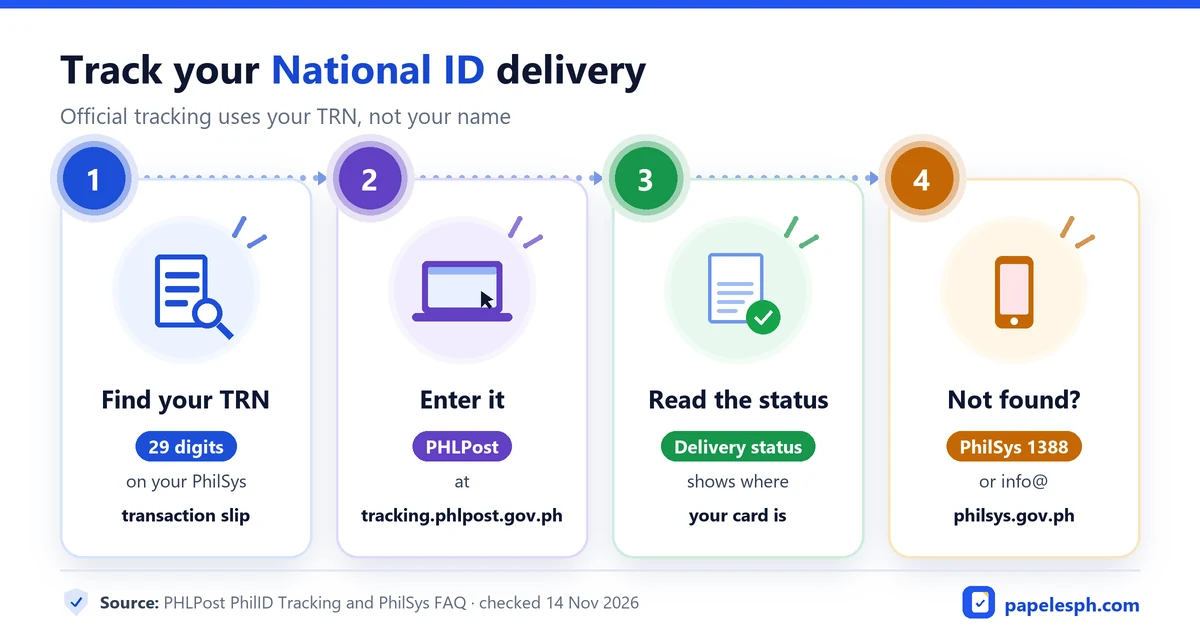
Tracking is free, and you don't need an account. Type the number carefully: one wrong digit gives a "not found" result.
Where to find your 29-digit TRN
The TRN is printed on the transaction slip issued at the last step of your registration. The PhilSys registration process page says to keep the slip, because the TRN is used to:
- track your National ID delivery, and
- check when your ePhilID (National ID in paper format) is available, and claim it at a registration center.
The TRN isn't the same as your National ID Number or the 16-digit card number printed on the card. You only need the TRN for tracking.
Can you track your National ID by name?
Not on the PHLPost tracker. The site has only a tracking-number field, with no name or birthdate search (checked 14 November 2026).
If you lost your transaction slip, the PhilSys FAQ says to send these details to any official PhilSys channel so they can retrieve your TRN:
- first name, middle name and last name
- suffix, if any (Jr., III)
- date of birth (month, day, year)
- sex
Send them through hotline 1388, Messenger m.me/PSAPhilSysOfficial, or info@philsys.gov.ph. Then track with the TRN they give you.
Be careful with "track by name" websites. Unofficial sites that ask for your full name and birthdate aren't run by the PSA or PHLPost. Give your details only to the official PhilSys channels above.
"Not found": what it means and what to do
PHLPost's advisory says that if the tracker shows NOT FOUND, you should contact PhilSys, not the post office. In practice, it usually means your card hasn't been handed to PHLPost for delivery yet.
| What you see | What to do |
|---|---|
| Not found | Check that you typed all 29 digits. If it's still not found, contact PhilSys: hotline 1388, m.me/PSAPhilSysOfficial or info@philsys.gov.ph |
| A delivery status | Follow the status. For a delivery problem with the parcel itself, PHLPost's customer service is on (02) 8288 7678 or phlpostcares@phlpost.gov.ph, Monday to Friday, 8:00 AM to 5:00 PM |
| Lost slip, no TRN | Ask PhilSys to retrieve your TRN (see the details to send above) |
Is there a National ID tracking QR code?
No official one. The PSA's tracking method is the TRN on PHLPost.
The QR codes on the National ID card and the printed ePhilID are for checking that the ID is genuine, according to the PhilSys page The National ID. You scan them at:
- verify.philsys.gov.ph (PhilSys Check) for the card and the ePhilID
- everify.gov.ph/check (National ID Check) for the Digital National ID
Neither site tracks delivery. Pages that promise a "tracking QR code" aren't official.
While you wait for your card
You don't have to wait for the card to use your National ID. The PhilSys FAQ says all formats have the same validity:
- Digital National ID: get it in the eGovPH app with a live selfie. See how to get your Digital National ID.
- Printed ePhilID: bring your transaction slip or TRN to the nearest registration center and ask for the National ID in paper format. It's free. Find a center in our National ID registration centers list.
The PhilSys FAQ says both have the same validity as the card. For an NBI clearance, ask the branch whether it takes them in place of the original card. See our list of valid IDs.
Official contacts
| Office | Contact |
|---|---|
| PhilSys (PSA) | Hotline 1388 · Messenger m.me/PSAPhilSysOfficial · info@philsys.gov.ph |
| PHLPost | Tracking: tracking.phlpost.gov.ph · Customer service (02) 8288 7678 · phlpostcares@phlpost.gov.ph (Monday to Friday, 8:00 AM to 5:00 PM) |
Tagalog: paano i-track ang National ID
Paano i-track: Ilagay ang 29-digit Transaction Reference Number (TRN) na nasa iyong PhilSys transaction slip sa tracking.phlpost.gov.ph para makita ang delivery status ng iyong PhilID. Kung NOT FOUND, tumawag sa PhilSys hotline 1388, mag-message sa m.me/PSAPhilSysOfficial, o mag-email sa info@philsys.gov.ph. Walang paghahanap gamit ang pangalan; kung nawala ang slip, hingin sa PhilSys ang iyong TRN gamit ang buong pangalan, petsa ng kapanganakan at kasarian.
Frequently asked questions
How do I track my National ID?
Enter the 29-digit Transaction Reference Number (TRN) from your PhilSys transaction slip at tracking.phlpost.gov.ph. The site shows your card's delivery status.
Can I track my National ID by name?
No. The PHLPost tracker only accepts tracking numbers. If you lost your slip, give PhilSys your full name, suffix, birthdate and sex through hotline 1388, m.me/PSAPhilSysOfficial or info@philsys.gov.ph to retrieve your TRN.
What is my National ID tracking number?
It's the 29-digit Transaction Reference Number (TRN) on the transaction slip you received when you registered. It's different from your National ID Number and your 16-digit card number.
My National ID tracking says "not found". What should I do?
Check that you typed all 29 digits. If it's still not found, PHLPost says to contact PhilSys through hotline 1388, Messenger m.me/PSAPhilSysOfficial or info@philsys.gov.ph. Meanwhile, use your Digital National ID or a printed ePhilID.
Is there a QR code for National ID tracking?
No official one. The QR codes on the card and ePhilID are for checking that the ID is genuine at verify.philsys.gov.ph, not for tracking delivery.
Can I use my National ID before the card arrives?
Yes. Get the Digital National ID in the eGovPH app, or claim a free printed ePhilID at a registration center with your transaction slip. They have the same validity as the card.
Keep reading
Digital National ID and ePhilID
Get your Digital National ID or printed ePhilID, check it's genuine, and track your card.
Read guideNational ID registration and centers
The 4 registration steps, what to bring, and every PhilSys center by region.
Read guideValid IDs in the Philippines
Which IDs the NBI, PNP, DFA, Pag-IBIG and SSS accept, from their own lists.
Read guideSources
- PHLPost: PhilID Tracking (Post Office Operational Update 13-2022)
- PHLPost Tracking (checked 14 November 2026)
- PhilSys FAQ (last updated 13 February 2026)
- PhilSys: The National ID (formats)
- PhilSys: Registration process
- verify.philsys.gov.ph
- everify.gov.ph/check
Last checked 14 November 2026. See how we research and the updates log.