Can you renew without appearance?
The PNP says the National Police Clearance "may be" renewed without appearance for three years from the last appearance. Which route you take depends on when you last went to a station:
| Your situation | How you renew |
|---|---|
| Last station visit was within 3 years | Online, without appearance, using the same NPCS account |
| Last station visit was over 3 years ago | With appearance. The PNP's guide says you must appear at a police station for biometrics and a picture |
| You'd rather go in person | With appearance, any time |
| You can't get into your old account | Try "Forgot password" first. Renewal is meant to use your existing account (see the problems table below) |
How to renew your police clearance online (no appearance)
The PNP's guide shows the renewal screens. They follow the same pattern as a first booking, under Clearance Application – Non-Appearance.
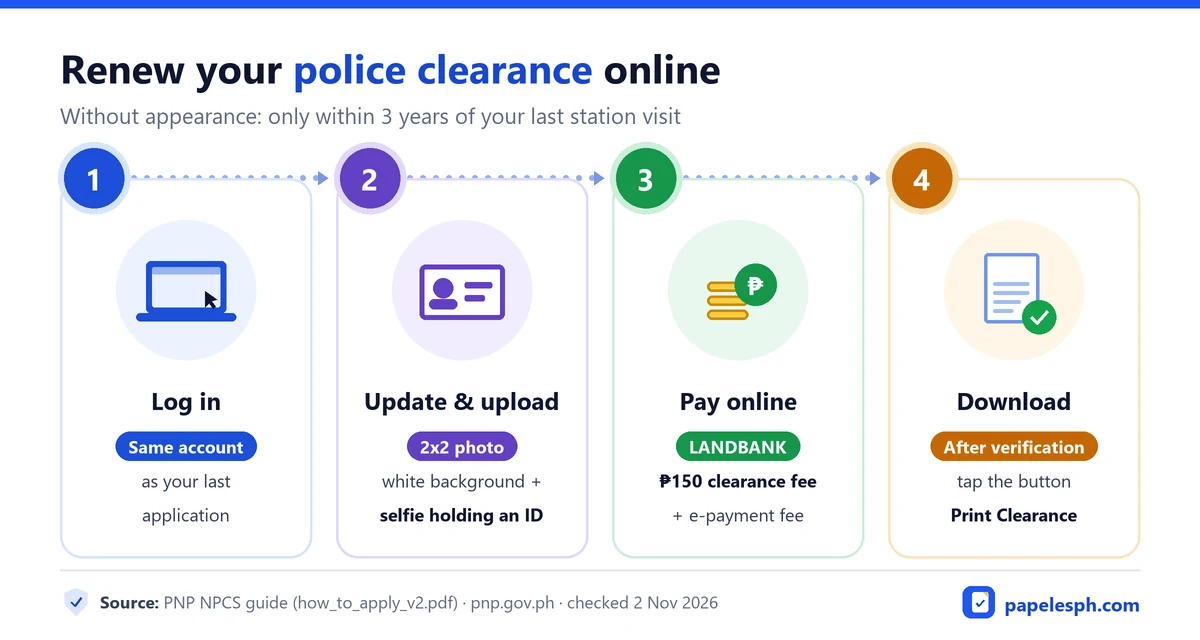
Log in to your old account
Use the NPCS account from your last application at pnpclearance.ph. The PNP's note says the uploads go to your existing account, the account used during your last appearance.
Update your profile
Check that your address and other details are current, and save.
Start a Non-Appearance application
The screen runs in four stages: Select Appointment, Upload Document, Select Payment Option and Save Appointment. (On a first application, stage 1 is labelled Purpose and Police Station instead.)
Upload your photos
At the Upload Document stage, upload a 2x2 picture with a white background and a selfie holding your valid government-issued ID.
Choose the payment option and save
Tap LANDBANK of the Phils.; the screen notes an additional fee for the e-payment service. Then tap Save Appointment.
Pay online
On your Transactions page, tap Click here to Pay and pay the ₱150 fee plus the channel's convenience fee.
Wait for processing, then download
A Processor or Verification Officer processes the renewal. Check its status on your Transaction History page. Once verified and approved, tap Print Clearance in your account to download it.
What to upload: renewal requirements
For a renewal without appearance you upload the requirements instead of bringing them:
- a 2x2 photo with a white background
- a selfie holding a valid government-issued ID
- your updated profile details
- online payment of the fee
Use a clear, well-lit selfie. Hold your ID so its photo and name are readable, and keep your face fully visible. A blurry upload can slow down verification.
- Within 3 years of your last appearance
- Upload a 2x2 photo (white background)
- Upload a selfie holding a valid ID
- Download once approved
- Required after 3 years without appearing
- Book a station and slot
- Biometrics, photo and signature retaken
Source: National Police Clearance System, pnpclearance.ph.
Renewing with appearance
If it's been more than three years since your last appearance, the PNP says you must appear at a police station for biometrics and a picture. You can also choose this route any time. It works like a first application: book a station and slot, pay online, then bring one valid ID, your reference number and proof of payment. See how to book an appointment and what to bring.
Fee and validity of a renewed clearance
- Fee: ₱150 plus a convenience fee that depends on your payment channel, per the PNP's guide. The PNP has proposed raising it to ₱200, but that's still only a proposal. See police clearance fees.
- Validity: the PNP says a National Police Clearance is valid for six (6) months. Renew close to when you'll actually submit it. See police clearance validity.
Renewal problems and fixes
These are practical tips, not official PNP rules:
| Problem | What to do |
|---|---|
| Forgot your password | Use "Forgot password? Click here" on the sign-in box. Recover the old account rather than making a new one, since renewal uses it. |
| Your address or details changed | Update your profile before you start the renewal. |
| Renewal still being processed | Check the status on your Transaction History page. It waits for the Processor or Verification Officer. |
| Over three years since your last visit | Book a renewal with appearance instead. |
| Status still PENDING after paying | Some channels take time to post. Keep your receipt and check again before paying twice. |
Sa Tagalog: paano mag-renew ng police clearance online?
Kung wala pang tatlong taon mula sa huling punta mo sa istasyon, puwede kang mag-renew online nang hindi pumupunta. Mag-log in sa parehong NPCS account, i-update ang profile, mag-upload ng 2x2 na litrato (puting background) at selfie na hawak ang valid government ID, at magbayad online. Kapag na-verify, i-download ito gamit ang Print Clearance. Kung lampas na sa tatlong taon, kailangang pumunta ulit sa istasyon para sa biometrics at litrato.
Frequently asked questions
Do I need the same ID I used last time?
The PNP asks for a selfie holding a valid government-issued ID. What must be the same is the account: the uploads go to your existing NPCS account from your last appearance.
How long does online renewal take?
The PNP's guide doesn't give a processing time. After you pay, a Processor or Verification Officer processes it, and you can follow the status on your Transaction History page.
I lost access to my old NPCS account. What now?
Try "Forgot password" on the sign-in page. Renewal is meant to use your existing account, so recover it rather than creating a new one if you can.
Can I renew at a local police station instead?
The National Police Clearance is renewed through the NPCS, online or with a booked station visit. For how it differs from a local clearance, see national vs local police clearance.
How long is a renewed police clearance valid?
Six months, the same as a new one, according to the PNP. See police clearance validity.
Keep reading
How to get a police clearance
The full NPCS process, from registration to release, in 4 steps.
Read guidePolice clearance validity
How long it's valid, and a checker for your expiry date.
Read guidePolice clearance fees and GCash payment
₱150 plus a convenience fee, and how to pay online.
Read guideSources
- PNP: National Police Clearance page (renewal, validity; updated 30 October 2026)
- PNP: How to apply for a National Police Clearance (PDF, including its Non-Appearance screens)
- National Police Clearance System (pnpclearance.ph)
Last checked 2 November 2026. See how we research and the updates log.